
Browser options
Browser options
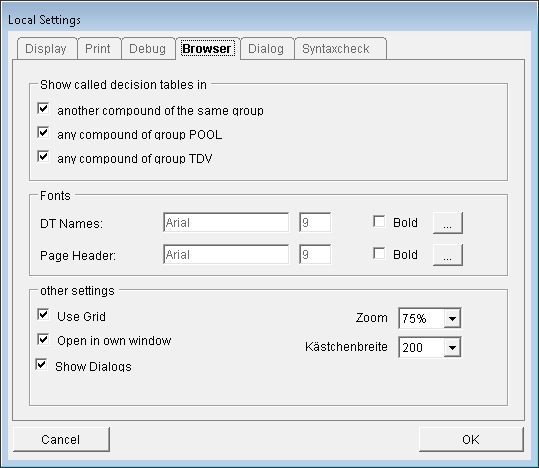
For the browser, the following settings can be adjusted:
·Compound jumps: individually configure whether or not the decision table calls beyond the current compound should be displayed. Possible jumps include jumps into other compounds in the same group, calls of logics from the group POOL, and the utilization of system standards from the group TDV.
Character sets: the character sets for the appearance of DT names (display and print) and the page header (print) can be configured.
Grid: use a grid when moving decision tables in the image. The grid size is defined by the height of the boxes.
Zoom: configure the zoom factor (box size). This setting also affects the size of the print.
Open in separate window When this option is checked, the browser is opened in a separate window instead of within the ePOS window. This setting is useful when using 2 monitors. Then the browser window can be placed on a different monitor than the ePOS window, which simplifies working with the browser. If you work with only one monitor, this option should not be checked. Otherwise, the browser window will disappear behind the ePOS window when a decision table is opened.
These settings can be found in the menu "Extras - Options".