
Description of the ePOS Database
Description of the ePOS Database
The installation is separated into a program directory and a data directory. The root directories are specified during the initial installation. Changes can be made at any time through moving or renaming the directories and the settings program.
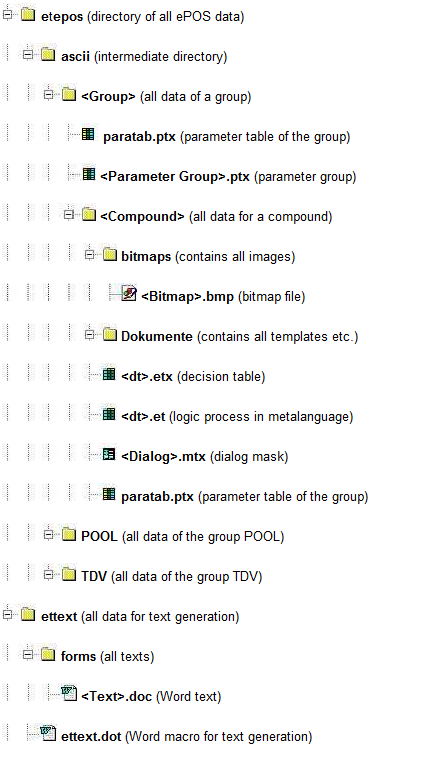
The data directory has the following structure:
Notes:
The names surrounded in angle brackets stand for the user-specifed names, e.g. <dt>.etx could stand for "Start.etx". These files/folders exist for each of the user`s objects.
All bitmaps used in the dialogs should always be saved in the specified directory. This allows them to be automatically recognized and included, for example when copying or renaming the compound.
In the ePOS explorer, they can be opened directly in a photo editing program (determined by the application which is associated with the .bmp file extension).
The directories for the groups TDV and POOL always exist. They contain the same structure as the user’s group(s).
On the group and compound levels, there are a series of files with the extension "dat". These contain administrative data.
The structure of the database corresponds to the logical structure of ePOS (see the structure of a compound, for example).