
Dialog Object Checkbox
Dialog Object Checkbox
The Checkbox, also called control box, presents a simple option for multiple choice, for example the "ticking" of options. It consists of a box and a (optional) text. If the element is selected, a small tick will appear in the box.
If only one option is allowed to be selected from the list, then the dialog object Radiobox can be used instead.
When operating the dialog via the keyboard, the Checkbox can be activated using the space key.
The assigned parameter receives the value 1 if the option has been selected or 0 if the box is empty. If the parameter is in the EMPTY state before displaying the dialog, the parameter still receives the value 0.
In addition to the general properties, a Checkbox has the following properties:
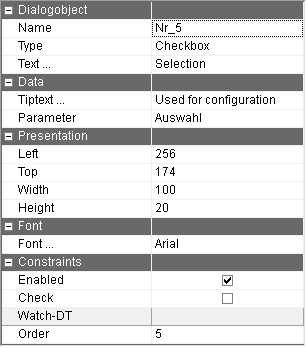
Text … | Text which should appear next to the box. It can be omitted if the description arises from an Textbox dynamically to the runtime. Using the button with the 3 dots, the text to be displayed can be recorded for every language of the dialog. |
Parameter | Parameter name of the parameter which is assigned to the Checkbox. When executing, if the parameter has the value 1 before the dialog is called, the tick will appear, the value 0 or EMPTY or UNDEF result in the box staying empty. If no value is selected, the parameter is 0 after the dialog has finished. |
Enabled | Whether the Checkbox value of the runtime is allowed to be changed can be determined here. This is a default setting which can be changed for the runtime with the function f$SetBoolProp. |
Check | By turning on the check, value changes can be directly reacted when exiting this field while running the dialog. This can be used for error messages as well as to set suggested values for other dialog fields. |
Tiptext | Multilingual assignment of a Tiptext. |
The Checkbox has to be assigned a parameter. Otherwise an error message appears when trying to save the dialog.