
Dialog Object Combobox
Dialog Object Combobox
The Combobox offers a list of values to choose from. Unlike with Listboxes and dialog object alternative buttons, free editing is possible in the field.
The appearance of the value or the selection values generally takes place via the format set for the target parameter in the para meter table.
In addition to the general properties, a Combobox has the following properties:
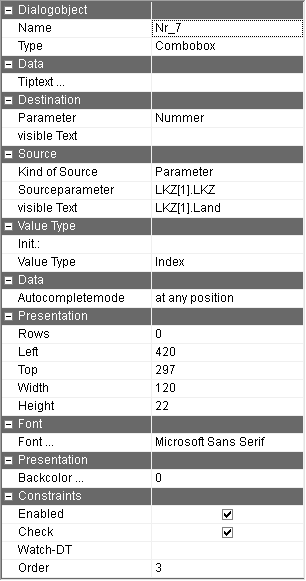
Parameter | Parameter name of the parameter which is assigned to the field. The parameter value or the data type complies with the setting "free input" / "selection only" / "index as target" (see below). For a return as an index, the datatype has to be an integer or has to resemble the data type of the data source/value list. The visible value of the selected entry is entered into "Parameter" (visible text). The parameter name can be selected in the input assistant and can be moved into this field using drag&drop. |
Parameter (visible text) | Name of the parameter on which the visible text is written. This parameter does not have to be specified. |
Kind of source | Selecting whether to use a fixed value list or an indexed parameter as a source. |
Source parameter | Parameter which contains the value stock of the cCombobox. This parameter must be indicated once either in the PG or in the parameter. A further once-indexed parameter can be recorded for the list of visible texts in order to multi-lingually use of the list box. In this case, the list of the parameter (visible text) is displayed but the content of the 1. parameter is returned. Allocating both arrays should be done by the same index, otherwise sensible processing is impossible. If the array with the visible text is larger than the array with the return values, no return value can be determined when choosing such an index. Whether the visible text is contained in the list of displayed texts is checked when using the free input. If it is, the corresponding text of the code stock is returned, otherwise the visible text is returned. The choice between the dynamic data source and the value list is determined with the option field on the left. |
Source: visible text | Parameter which contains the text of the Listbox which is to be displayed. This parameter has to be indicated just like the source parameter |
Item list | Fixed value stock which is recorded in the dialog itself. After choosing the button, a window appears in which the value list can be edited. The values are displayed as a table for editing. In every row, a value is recorded in all defined languages of the dialog as well as the CODE language. With the arrow keys next to the "convert" text, the Order of rows can be changed. When a row is chosen by selecting the button on the left hand edge, the entire row can be deleted using the delete key. (also see the description of the Dialog object Listbox) If the same value list is needed more than once, then the data source (see below) should be used so that changes only have to be made once. |
Value Type | You have the choice of the following options: Free input: The user can freely input the value in the Combobox but also choose from the value list (recommended). The target parameter then contains the value of the field. Selection only: The value list is opened straight away when the field is clicked on so that only a choice from that list is possible. Index as the target: Just like with "selection only", only a selection from the value stock is possible. However, the target parameter is assigned the running number of the selected element instead of the list value, so "1" for the fist entry, "2" for the second etc. |
Autocompletemode | By checking this option the list of the displayed items is filtered with the keyboard input. |
Check | By activating the check change, the choice of Combobox can be reacted to directly during the execution of the dialog. This can be used for checking the choice as well as to set the proposal value for other dialog fields. |
Rows | The size of the value list which open can be set here. If several values are present during runtime, it is possible to scroll in the value list and with less values, the list is automatically shrunk. |
Tiptext | Multilingual assignment of a Tiptext. |
The Combobox has to be assigned a parameter. Otherwise an error message appears when trying to save the dialog.