
Dialog Object Frame
Dialog Object Frame
With the Frame dialog object dialog fields are optically collated into one group as well as when creating a group. The Frame consists of a (deepened) 3D frame and a Caption which can be omitted.
If only a simple or filled out frame needs to be drawn around the dialog fields, then the dialog element shape can be used instead of the group.
After creating a new Frame, any number of dialog objects can be pulled in and of course out of the Frame. All dialog objects which lie completely within the Frame are part of the group which means that when the group is moved, all those dialog objects are moved too. When deleting, these objects are only deleted together with the Frame if they have been specifically marked.
The Frame is marked by clicking in the middle of it (on a spot where there is no other dialog element).
Please note: The Frame is always treated as an area. It is possible for example that a dialog object finds itself "behind" the Frame, for instance when the Frame is dragged over a dialog object. In this case the object "behind" is no longer visible. If it involves an object with a parameter, for example a Textbox, then this can cause an error message during runtime if it has an incomplete or incorrect parameter assignment. The Frame has to be temporarily moved in order to find such an invisible dialog field.
In addition to the general properties, a Frame has the following properties:
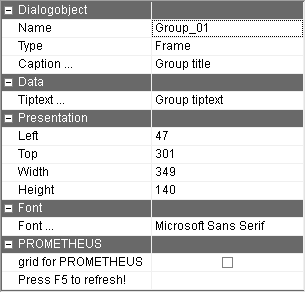
Caption … | Group Caption This can fall away too. Using the button with the 3 dots, the text to be displayed can be recorded for every language of the dialog. |
Tiptext … | Multilingual assignment of a tip text (tooltip). This tip text is displayed only in PROMETHEUS. This option is only visible if the "Export dialog to PROMETHEUS" option in the "Local settings" in the "Dialog" tab in the "PROMETHEUS" group is active. |