
Dialog Object Label
Dialog Object Label
The Label presents an unchangeable text in the chosen font type. It is used for heading, field descriptions and so forth.
The Label is not assigned a parameter. Should Captions which contain the current offer numbers for example, only be able to be determined during runtime, a Textbox can be used instead which has the appearance attribute "no frame". In that way the text can then be determined in the DT during runtime and optically it is indistinguishable from a "proper" fix ext.
Note: The size of a Label cannot be changed since it is fully determined by the text itself in connection with the font.
In addition to the general properties, a Label has the following properties:
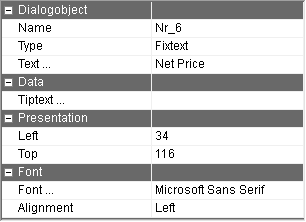
Text … | The text to be displayed. Using the button with the 3 dots, the text to be displayed can be recorded for every language of the dialog. Note: In case no text to be displayed has been recorded for the currently set language, a _ is displayed in order to locate the Label in the dialog again. |
Alignment | Flushness of the text. This only affects texts with multiple rows. |
Tiptext … | Multilingual assignment of a tip text (tooltip). This tip text is displayed only in PROMETHEUS. This option is only visible if the "Export dialog to PROMETHEUS" option in the "Local settings" in the "Dialog" tab in the "PROMETHEUS" group is active. |