
Dialog Object Radiobox
Dialog Object Radiobox
The Radiobox allows you to choose an alternative from a (fixed) list. The dialog object contains a (deepened) 3D frame with an optional Caption and individual Radioboxes which comprise of a text and the "switch button".
Within the decision table the Radiobox is represented by a single parameter of an integer or character string type. The value of the switch matches that of the running number of the alternative in the frame (integer parameter) or that of the text assigned to the switch (character string parameter).
If the Radiobox is not set (all buttons empty), the parameter receives the EMPTY state (character string) or the value - 1 (integer).
The entire Radiobox (the frame) is marked by clicking inside the area, the individual switch is marked by clicking on the text.
A new single switch is created using the button "New Alternative". The creating Order also determines the running number which is transferred in the case of an integer parameter. The Order is subsequently changeable. The individual switch button cannot be dragged out of the frame.
In addition to the general properties, a Radiobox has the following properties:
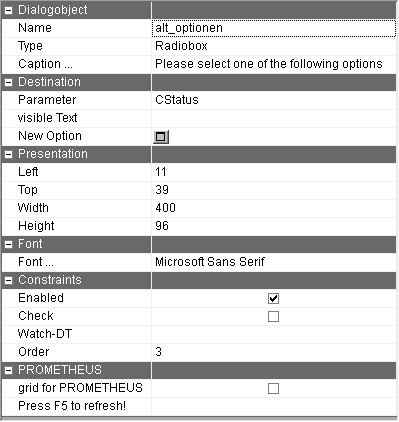
Caption … | Frame Caption which explains the selection. The text can also be omitted. Using the button with the 3 dots, the text to be displayed can be recorded for every language of the dialog. |
Parameter | Parameter name of the parameter which is assigned to the Radiobox (see above). When executing, if this parameter has a value >0 (whole number) before the dialog is called or a text value (character string), the appropriate alternative is activated. Otherwise the selection remains empty. The additional language "CODE" is contained in the value list. The value of this column is written onto the parameter in order to achieve a language dependent allocation of the parameter. The parameter name can be selected in the input assistant and can be moved into this field using drag&drop. |
Parameter (visible text) | Name of the parameter on which the visible text is written. This parameter does not have to be specified. |
New Option | A new single switch will be created. This will receive individual properties (see below). |
Enabled | Whether the Radiobox of the runtime is allowed to be changed can be determined here. This is a default setting which can be changed for the runtime with the function f$SetBoolProp. |
Check | By activating the check, value changes can be directly reacted to when exiting this field while running the dialog. This can be used for error messages as well as to set suggested values for other dialog fields. |
The Radiobox must be assigned a parameter. Otherwise an error message appears when trying to save the dialog.
A Radiobox (single switch) has the following properties:
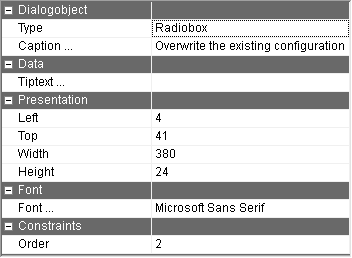
Caption … | Description of the alternative. Using the button with the 3 dots, the text to be displayed can be recorded for every language of the dialog. Just like with Listboxes and Comboboxes, "CODE" is recorded as an additional language. |
Order | Determining the Order of the individual alternatives. |
Tiptext | Multilingual assignment of a Tiptext. |