
Dialog Object Shape
Dialog Object Shape
The Shape is simply a border or a background in the shape of a rectangle or an ellipse which can also be filled with color.
Compared to the Shape dialog object, the Shape has no real link with the objects on the inside. So if the Shape with its "content" needs to be moved, all fields on the inside as well as the Shapre itself need to be marked.
The Shape is marked by clicking on any spot inside its area. It is always displayed in the background so that it does not "cover" any fields.
In addition to the general properties, a Shape has the following properties:
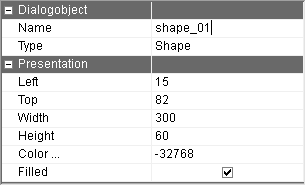
Color | The Shape color It can be selected from a color table. |
Filled | The Shape can be displayed in the selected color as a thin line or as a filled out area. |