
Dialog Object Treeview
Dialog Object Treeview
The treeview serves to display content of indexed parameter groups as a structure. A condition for using this element is an information structure which contains fields which enable a father-son relationship between the entries of the list. In this structure! The Father’s entry must always be before that of the child. This implies that the 1. List entry is the father of the structure.
In addition to the general properties, the tree view has the following properties:
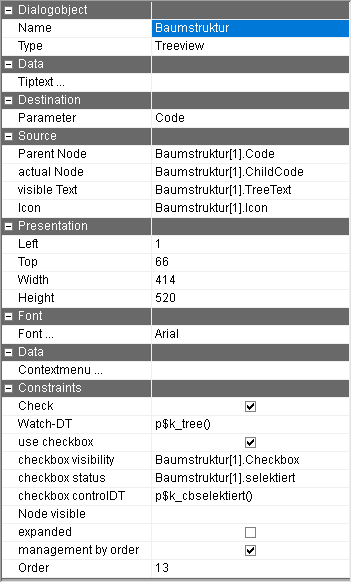
Parameter | Parameter name of the parameter which contains the current selection in the tree view. The data type of the target parameter determines the type of return: for the data type integer, the running number of the marked cell is returned, for a character string, the node name of the marked node. Decimal parameters should not be used. |
(Source) parent node | Determining the parameter with the data to label the father node. |
(Source) actual node | Defining the parameter with the data to label the current node. |
(Source)visible text | Determining the parameter with the data to label the current node. |
Icon | Determining the parameter which allows the allocation of an icon (only images of the ICO type) to the corresponding entry. If icons are used, every entry must receive an allocation. If this is not the case then the first icon found will be used. |
Attribute | When using the dialog on the WEB, the name of the Watch-DT can be entered which is activated when clicking on a node. |
ContextMenu … | By pressing this button, a dialog is opened in which a menu can be defined which is opened by right clicking in the tree view. For each menu point, a decision table must be recorded in the syntax p$DTName() and for every language used in the displayed text. |
Check | By activating the check, changes in the selected nodes can be reacted to directly during the execution of the dialog. Thereby other dialog fields can be directly determined, an image can be blended in for example. |
Watch-DT | Decision table which is executed when the check is activated. |
Use check box. | Displaying a check box at every node at which the value of the "display check box" is 1. |
checkbox visibility | With this parameter name the visibility of the checkbox is controlled for each node. Value 1 means that the checkbox is visible. If no parameter is specified, the checkbox is visible in every node. |
Checkbox status | This parameter name controls the status (checked or not) of the check box per node. Value 1 means that the checkbox is checked. |
Checkbox ControlDT | Decision table which is called if the tick in the check box is changed. |
Node visible | This parameter name controls the visibility per node. Value 1 is visible |
Management by Order | If the content of the parameter group of the tree structure changes during the execution of the Watch-DT, two variants of processing exist. For variant 1 (control via Order is ticked) all parameter group rows are compared with the currently displayed tree view. Small changes like a changed icon for example or a changed text are adjusted directly, if larger changes are recognizable, the entire tree structure is rebuilt. In the process, the previously opened nodes are reopened. For variant 2 (control via the Order is not ticked), the content of the parameter group is not compared via the Order but via the node labels. If all nodes have an obvious label and no moving of nodes is contained in the structure, this variant has the advantage that a complete rebuild of the tree structure is very unlikely. If double node labels are in place, some nodes may not be displayed. If no rows are added, deleted or moved in the Watch-DT, it does not matter if this property is ticked or not. |
Expanded | If this switch is ticked, the tree structure is completely opened when the dialog is started. |
Tiptext | Multilingual assignment of a Tiptext. |
Displaying a shopping cart is a typical example of the use of the tree view. If the entire shopping cart is read into the indexed parameter group SC using the function: SC[1]MaterialHeadID, as current node, SC[1].MaterialPosID and as label: SC[1]can be used as a name for the superior node.
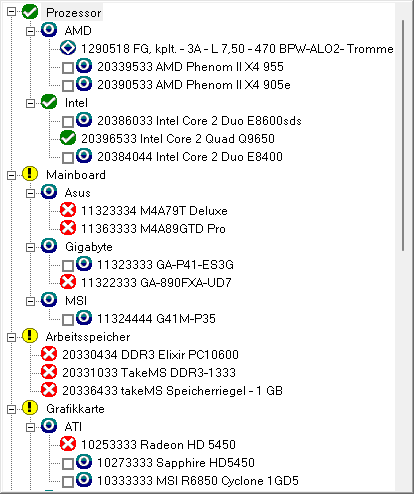
Example of a tree structure with checkboxes and icons.