
Display options
Display options
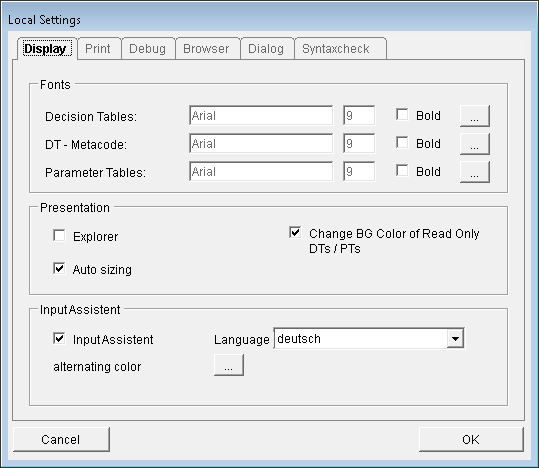
Here, the character sets for the output, as well as the appearance of the ePOS Explorer and the Input Assistant can be configured.
Fonts
Here, the fonts can be configured, including the size and style (bold or regular). All fonts installed on the system are available.
These settings can be configured separately for
Decision tables
Metalanguage DTs
Parameter tables
The individual settings can be applied by clicking the "..." button to the right of the respective entry.
Please note:
When configuring fonts, only the "Regular" or "Bold" styles may be selected! All other options, e.g. cursive, will not be saved!
For the metalanguage tables, a monospaced font should be used for better readability (e.g. "Courier New").
Display the Explorer
The selection of ePOS objects can be done with the ePOS Explorer.
The ePOS Explorer can also be opened with the menu entry "Window - Explorer". Another possibility is to use the explorer within the Input Assistant (see also the settings for the Input Assistant).
Wich Auto sizing the size of the edit window automatically will be resized by changing the content.
Input Assistant
The Input Assistant can be automatically opened when the program is started.
Language: specify the language of the ePOS functions. Selecting "Default" will cause the interface language of the Development System to be used. It can also be independently set to English or German. Then, the function names and syntax descriptions are displayed in the specified language, while the function description and the help remain in the language of the development system.
These settings can be found in the menu "Extras - Options".