
Structure of the conditions
Structure of the conditions
The conditions of a decision table are logical expressions in the form of a comparison. When all conditions of a rule are true, the actions (of this rule) are executed.
Only one rule is ever executed - the first whose conditions are all satisfied. The assessment of the rules begins with rule 1. If no executable rule is found, the ELSE-rule is automatically fulfilled, since it does not have any conditions.
A DT does not have to contain conditions In this case, the actions of the first rule are executed.
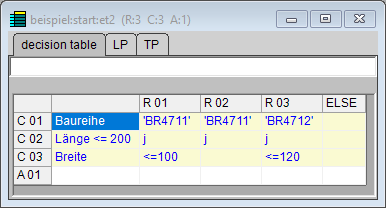
The expression can be located completely in the condition text, completely in the condition identity, or separated at the comparison operator - for comparisons of equality, the operator can also be omitted. This results in the following options:
Condition text | Condition identity |
<logical expression> | The character y or n (also: Y or N) |
Empty | <logical expression> |
<Expression1> <comparison operator> | <Expression2> |
<Expression1> | <comparison operator> <Expression2> |
<Expression1> | <Expression2> |
A condition has no meaning, or rather, is not assessed, if the respective condition identity is empty. Spaces between expressions and operators can be added, or also omitted entirely, for better transparency.
Comparisons with "and" and "or" are also possible. These have the following syntax:
Condition text | Condition identity |
Length | >= 100 && Length <= 200 |
Examples:
Condition text | Condition identity |
PlateLength >= 100 | Y |
| PlateLength>=100 |
PlateLength >= | 100 |
PlateLength | >=100 |
Product | ’BR4711’ |
f$IsNoVal( ’PlateLength’ ) | N |
The decision if a condition appears completely in the condition text or not should be made depending on whether or not this condition is "standard" for the respective rules. This considerably improves the readability of the decision table so that it can be used directly as documentation in many cases.