
Version Control
ePOS Management-Database
Starting with ePOS Version 8.0, all ePOS files (rule sets) are saved in a database. The ePOS distribution includes the Microsoft SQL Server Express Edition, which does not require any further licensing through the customer. If a customer already uses a licensed MS SQL server, it can be used as well.
Using a database is optional for customers that do not utilize any stand-alone ePOS runtime licenses. This is generally the case when ePOS is used within SalesManager or ConfigurationManager. This makes all version control functions and additional features in the future unavoidable, however.
The complete rule-based controls are saved as a write-protected copy of the database in a working directory of the controls developer. While being edited, the ePOS controls are copied into this directory and the write-protection is removed ("check-out"). After the edit is completed, the rules are saved in the database again and protected in the working directory ("check-in"). The database keeps track of which controls are being edited by whom. The ePOS database also manages the ePOS controls developer and the ePOS administrator, who owns extended permissions.
If ePOS objects (decision tables) are modified, they must be checked out, and checked back in after completion of the modification. The "check-out" and "check-in" processes prevent simultaneous modification of the same object. The processes are monitored, allowing improved organization and management of changes to controls. All files which are not checked out for editing are write-protected.
During the first startup, a copy of the rule-based controls are created in the working directory of the controls developer ("retrieve").
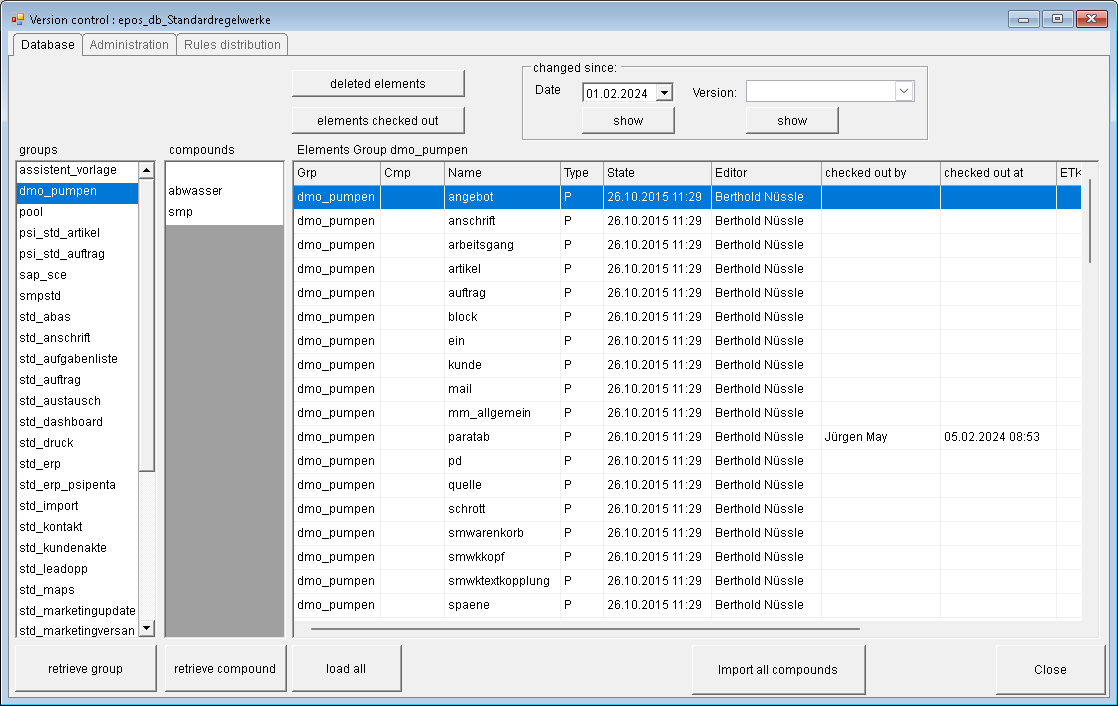
When the ePOS development system is started, a check for elements modified since the last "retrieve" is performed. If this is the case, the user is asked if he would like to retrieve these in order to update his versions of the controls to the newest versions. The elements that are to be retrieved are displayed in a table.
Since Version 8.0, ePOS utilizes defined directories (file paths):
Working directory of the rule developer. This directory exists for each controls developer.
Development system directory: directory in which the ePOS processes (run-time system) runs for test purposes
Productive directory: directory in which ePOS processes (run-time system) run productively.
Defined and logged transfers exist between the directories, e.g. from "Test" to "Productive", which can only be performed with administrator rights.