
f$WebService
f$WebService
Execute a web service that can be called with the REST protocol. Details for this in Wikipedia https://en.wikipedia.org/wiki/Representational_state_transfer Usually data is given to the web service in the form of an XML buffer. The result is returned similarly as an XML buffer and optionally in an XML-file if declared in PGOutput. In order to display the text correctly the encoding (key word ’Accept-Charset’) should be defined in the PGOutput (HeaderIn). Possible values for Accept-Charset are: ’ISO-8859-1’, ’UTF-8’, ’UTF-16’.
Example: See below.
Syntax: | Result = f$WebService ( Service , Input [,Method, PGInput, PGOutput] ) | ||
| Argument | Type | Meaning |
| Service | String | Address for the service to be executed. Usually a website accessible using http |
| Input | String | The XML buffer given to the service additionally |
| Method | String | Used method of the call (GET, POST). This parameter is optional, default is POST |
| PGInput | String | The name of a parameter group with the parameters Name and Wert. This parameter group can be indexed. For each line of the parameter group, a corresponding line is entered in the header of the request. This parameter is optional. In addition to the individual header of the called web service, the following keywords can be used: FileName - when using the file download function CertificateFile - name with path of a certificate file (.pem) CertificatePassword - password of the certificate, if required. If no password is required, omit the keyword. Content-Type, Domain, User, Password, Accept, Timeout, Accept-Charset, OutputFile |
| PGOutput | String | The name of a parameter group with the parameters Name and Wert. This parameter group should be indexed. For each line of the response header, a value pair is entered in the parameter group. This parameter is optional. In addition to the individual header of the called web service the following key words can be used: Content-Type, Domain, User, Password, Accept, Timeout, Accept-Charset, OutputFile |
Result: | Result | XML buffer received from the service. | |
Sample: | Note: The data in the example has been truncated. HeaderIn[1].Name = 'Authorization' HeaderIn[1].Wert = 'PROMETHEUS-TOKEN ...' HeaderIn[2].Name = 'Accept' HeaderIn[2].Wert = 'application/xml' HeaderIn[3].Name = 'OutputFile' HeaderIn[3].Wert = 'C:\\Temp\\OutputFile.xml' HeaderIn[4].Name = 'Accept-Charset' HeaderIn[4].Wert = 'ISO-8859-1' Service = 'https://www.acbis.cloud/prometheus/...' Result = f$WebService ( Service , '' , 'GET' , 'HeaderIn' , 'HeaderOut') 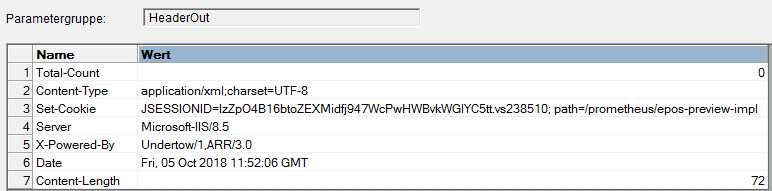 | ||