
File Menu
File Menu
The "File" menu contains the following entries:
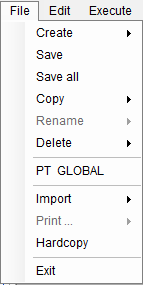
Create | Create groups, compounds, decision tables, dialogs, and parameter groups |
Save | Save the active window |
Save All | Save all windows |
Copy | Copy groups, compounds, decision tables, dialogs, and parameter groups |
Rename | Rename decision tables, dialogs, and parameter groups |
Delete | Delete the object in the active window |
PT GLOBAL | Open the parameter table GLOBAL |
Import - ODBC Table | Import parameters from a database table into a parameter group |
Print … | Print a decision table, a parameter table, a dialog, or an entire compound |
Hardcopy | Output the active window to the Windows clipboard. By pasting it into Microsoft Word or another program, the screenshot of the window can be inserted into documents or printed. |
Exit | Close ePOS. If any windows with unsaved modifications are open, the program will ask if these should be saved. |
See also: