
Properties of a Decision Table
Properties of a Decision Table
The following context menu is offered for a decision table:
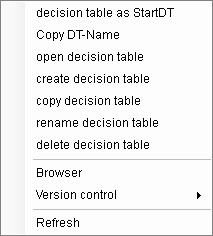
Set decision table as StartDT: This DT is entered into the list of DTs to be executed as the current entry.
Copy DT name: Including the name of the DT. Group and compound is saved in the Windows Clipboard in order to enter this DT into SalesManager as an event for example.
Open decision table: The DT is opened with the DT editor
Create decision table: Call up the menu function "File - Create - DT..."
Copy decision table: Call up the menu function "File - Copy - DT..."
Rename decision table: Call up the menu function "File - Rename - DT..."
Delete decision table: Call up the menu function "File - Delete - DT..."
Browser: Call up of the graphic browser to display the decision table structure of the marked DT’s compound.
Refresh: The display is rebuilt
The compound belonging to the marked decision table becomes the active ePOS application.