
PSIPENTA interface
PSIPENTA interface
Attention: a separate license (EPOSPSIPENTA) is required for using this interface.
Any data can be read and written into PSIPENTA with the functions in this interface. The interface works with the PSIPENTA business objects. The way these business objects work is similar to interactive work with PSIPENTA forms. The following procedure typically applies for reading data records.
Open the belonging object.
Select the filter view.
Enter the filter criteria.
Change to detail view.
Read the data.
Select the next data record...
Access to the data in the forms is made using the names of the fields. These can be calculated in the PSIPENTA forms by positioning the cursor on the desired field. The field name is displayed after a short time.
When writing data in PSIPENTA forms you must ensure that the PSIPENTA check criteria for the form are not damaged. This involves the maximum field lengths, selection lists in the value inventory, and the checking mechanism for the form. Before using this interface to insert a data record, you should enter such a data record interactively and note the system messages with this.
The examples from the PSIPENTA_STD group should be read through in order to better understand the interface.
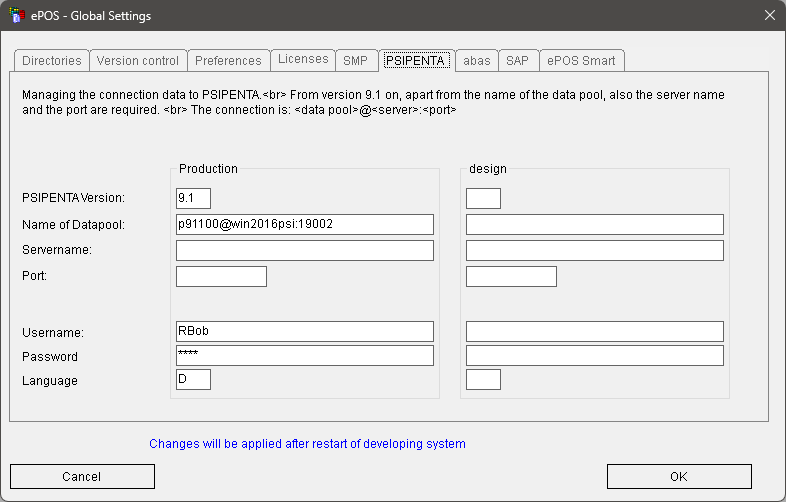
The log in function must generally be called before using the interface. If this does not occur, the interface attempts to process the log-in itself. To do that, the data entered in the PSIPENTA tab in the ePOS settings is used.
Interface functions:
f$PSI_Login | Log in to PSIPENTA |
f$PSI_Logout | Log out of PSIPENTA |
f$PSI_CreateBO | Create a business object |
f$PSI_DeleteBO | Delete a business object |
f$PSI_Filter | Open a business object filter |
f$PSI_Detail | Open the detail view for a business object |
f$PSI_GetField | Read a field in the current view |
f$PSI_SetField | Set a field in the current view |
f$PSI_Error | Read the current error message |
f$PSI_Clear | Clear the view for a business object |
f$PSI_GetFields | Read a list of fields into a parameter group |
f$PSI_SetFields | Set a list of fields from a parameter group |
f$PSI_Execute | Execute a command in the current view |
f$PSI_Save | Save the data in the current view |
f$PSI_Message | Read the last system message |
f$PSI_Read | Perform a read in the current view with the current data |
f$PSI_ReferenceBO | Create a reference business object |
F$PSI_ActiveBO | Read the active business object |
See also:
List of return values for the functions
f$PSI_CreateBO (f$PSI_ErzeugeBO)
f$PSI_DeleteBO (f$PSI_LöscheBO)
f$PSI_Overview (f$PSI_Uebersicht)
f$PSI_RemoveSelected (f$PSI_LoescheAuswahl)
f$PSI_GetField (f$PSI_LiesWert)
f$PSI_SetField (f$PSI_SetzeWert)
f$PSI_GetFields (f$PSI_LiesWerte)
f$PSI_SetFields (f$PSI_SetzeWerte)
f$PSI_Execute (f$PSI_Ausführen)
f$PSI_Save (engl. f$PSI_Speichern)