
ABAS interface
ABAS interface
Any data can be read and written in ABAS with the functions in this interface. The interface works with the ABAS Active X interface.
Access to the objects’ data occurs via the names of the fields. These can be calculated in the ABAS forms by positioning the cursor on the desired field and pressing the keyboard combination ALT + Enter.
Generally, when entering parameter groups in the interface, the name of the ABAS field to be used while reading or writing the data record must be in the column Designation of the parameter group definition. Generally, the name: number can be used for reading an identification number, even if the name is only num, num2, or num3 in the form. Furthermore, the identifier relating the field to the article can start with artˆ before its actual name, if there are two instances of the same name when reading positions in an offer or order, e.g.: artˆnumber. Since this is only allowed for reads, it is recommended to use another parameter group definition for reading positions than the one used when writing positions.
When writing data in ABAS forms, you must ensure that the ABAS check criteria for the form are not breached. Before using this interface to insert a data record, you should enter such a data record interactively and note the system messages with this.
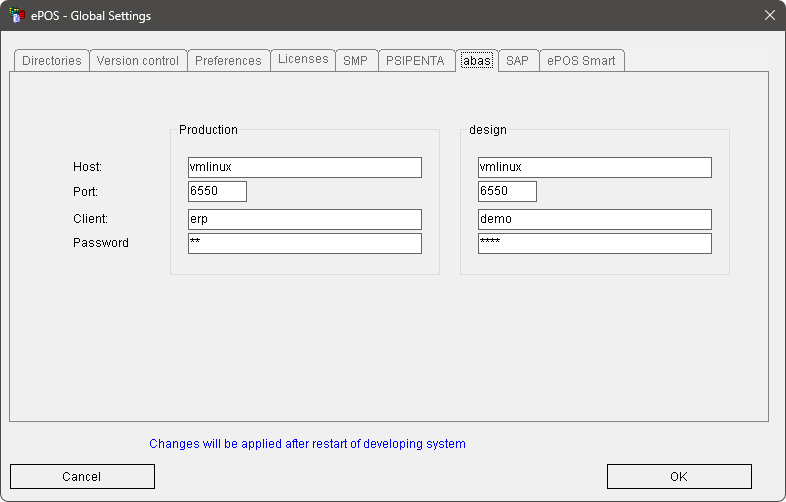
Generally the log-in function f$ABAS_Login (Hostname,Port,User,Password) must be called before using the interface. If this does not occur, the interface attempts to process the log-in itself. The data entered in the ABAS tab in the ePOS settings is used for this.
Interface functions:
Log in to the ABAS interface | |
Log out from the ABAS interface | |
Activate or deactivate a log file for the interface | |
Create an order with positions in ABAS | |
Read an order and its positions from ABAS | |
Create an offer with positions in ABAS | |
Get an offer and its positions from ABAS | |
Read an article from ABAS | |
Create or modify details for a customer in ABAS | |
Read customer data from ABAS | |
Read from any table in ABAS | |
Create or modify any object in ABAS | |
Get the last ABAS error message |