
f$ABAS_GetData (f$ABAS_Datenlesen)
f$ABAS_GetData (f$ABAS_Datenlesen)
Any data from ABAS can be read with this function. The search is managed through a search parameter group. However, the only parameters which are evaluated are those for which an allocation to an ABAS field was made in the designation column in the parameter group definition. Wildcards are always used for searching. The search criteria could be extended by using a individual search string in ABAS Syntax. A table name must be entered for the search. For example, this could be Sales:Order. When using these keywords, the search only works if the ABAS system is set to English, so it is recommended to instead use the internal numbers of the tables:
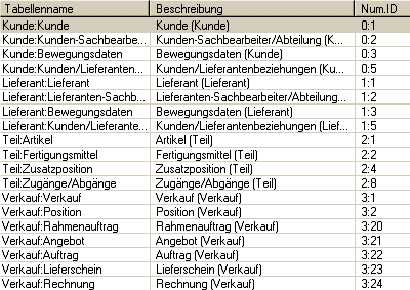
This list can be viewed with the EDPViewer tool.
Please note: the name of the parameter groups is usually entered in string constants, i.e. in quotation marks.
Syntax: | Status = f$ABAS_GetData (TableName, SearchPG, DestPG, NameCount, Order [, Where]) | |||
| Argument | Type | Meaning | |
| TableName | String | Name of the table to be read to. | |
| SearchPG | String | Name of the parameter group containing the search criteria. This parameter group either has to be indexed, or the index used must also be entered. | |
| DstPG | String | Name of the parameter group to which the table data is written. This parameter group must be indexed. If needed, the size will be extended. | |
| NameCount | String | Name of the parameter on which the number of data records found is written. | |
| Order | String | Sort criteria. Only the field name to be used for sorting search results is to be entered here. You cannot sort by any field. You can only sort by fields which can also be selected with interactive search. | |
| Where | String | The search criteria. This argument is optional. | |
Result: | Integer | Status of the function: -4 : argument is not consistent -3 : the operation has failed (an error analysis can be performed using the log file) -2 : no data found -1 : the interface has not been logged in to 0 : the data was read successfully | ||
Example: | In this example, all addresses beginning with A are read. Status = f$abas_login('linux',6550,'erp','sy') f$abas_logfile('c:\\temp\\abas' + f$date('yyyyMMdd_hh_mm_ss') +'.log') Address_s.Preferredname ='A' Status = f$abas_getdata ('0:1', 'Address_s', 'Addresses', 'Count', '') f$abas_logfile('') Status = f$abas_logout() | |||