
Parameter group SAP_BAPI
Parameter group SAP_BAPI
In this parameter group, all information needed for calling a function component in SAP is consolidated.
Name | Description | Type | I1 |
FunktionsName | Name of the BAPI or ABAP program to be executed | String |
|
AnzahlTabellen | Number of transfer tables | Integer |
|
SAPTabellenName | Name of the table | String | 50 |
SAPTabellenTyp | Base table | String | 50 |
TabellenDatenPG | Names of the allocated ePOS PGs with the table data | String | 50 |
Tabellenrichtung | Identifier for if the table is to be written (1) or read (0) to SAP | Integer | 50 |
AnzahlZeilen | Number of table lines | Integer | 50 |
AnzahlExport | Number of export parameters | Integer |
|
ExportParameterName | Names of the export parameters | String | 50 |
ExportParameterWert | Values of the export parameters | String | 50 |
ExportParameterTyp | SAP data types of the export parameters | Integer | 50 |
ExportParameterDez | Number of decimal places in the export parameter | Integer | 50 |
ExportSAPTabellenTyp | Base table when data type 5 | String | 50 |
ExportTabellenDatenPG | Names of the allocated ePOS PGs with the table data when data type 5 | String | 50 |
AnzahlImport | Number of import parameters | Integer |
|
ImportParameterName | Names of the import parameters | String | 50 |
ImportParameterWert | The value is written on this parameter | String | 50 |
ImportParameterTyp | SAP data types of the import parameters | Integer | 50 |
ImportParameterDez | Number of decimal places in the import parameter | Integer | 50 |
ImportSAPTabellenTyp | Base table when data type 5 | String | 50 |
ImportTabellenDatenPG | Names of the allocated ePOS PGs with the table data when data type 5 | String | 50 |
AnzahlChange | Number of change parameters | Integer |
|
ChangeParameterName | Names of the change parameters | String | 50 |
ChangeParameterWert | Value of the parameter | String | 50 |
ChangeParameterTyp | SAP data types of the change parameter | Integer | 50 |
ChangeParameterDez | Number of decimal places in the change parameter | Integer | 50 |
This information is organized in the following blocks:
-Name of the function component
-Tables
-Import parameters
-Export parameters
-Change parameters
The information that a function component needs can be found in its documentation. You can use the command se37 in SAP to view function components. After selecting the function component the following dialog appears:
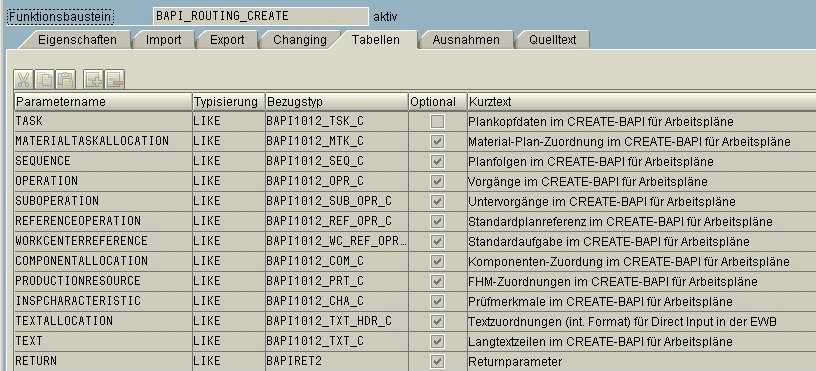
The parameters listed in the Import tab are to be transferred as export parameters to ePOS, and the parameters listed in the Export tab as import parameters.
See also: