
Transfer a table description to ePOS
Transfer a table description to ePOS
The content of a table can be displayed and written as a file on the local computer using one of two SAP functions: CRS_GET_DDIC_TABLE or Z_EPOS_GET_DDIC. The function Z_EPOS_GET_DDIC is not a system function, but a function of its own. It is available in the source text in the folder TDV\SAP in the rule-based control directory. You can display the functions using the command se37. Select Insert the name of the function and Display.
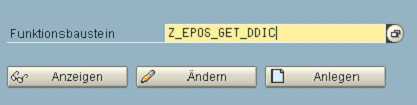
After that the function is displayed. The function is executed with the F8 key. A dialog appears for entering the desired table name. Press F8 again and the following image appears:
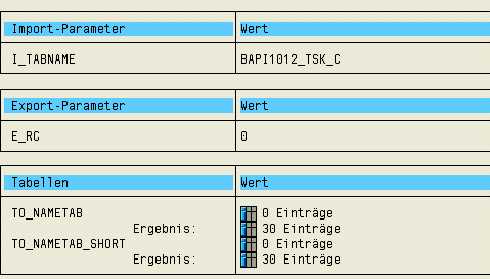
By clicking on the symbol: the table view is opened. To show all lines
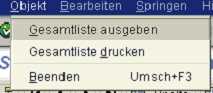
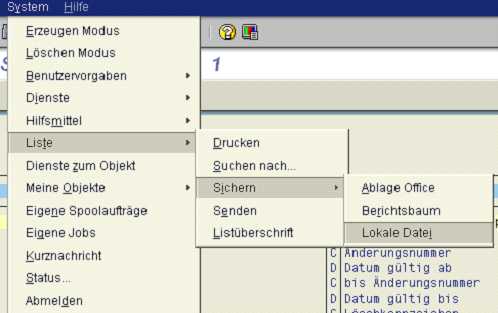
you must select: "Produce entire list" in the menu. The displayed content can subsequently be saved onto the local hard drive using the following selection. Unconverted is to be selected as the format of the list.
It is recommended to use the function Z_EPOS_GET_DDIC instead of CRS_GET_DDIC_TABLE. Of the two tables presented, TO_NAMETAB_SHORT should be used, because when presenting lists they are restricted to 255 characters in width if they are long, and for that reason FIELDTEXT is not written.
This file can be read into an ePOS parameter group by executing the decision table tdv:sap:import_tabelle. The selection of data is done using an ePOS dialog.
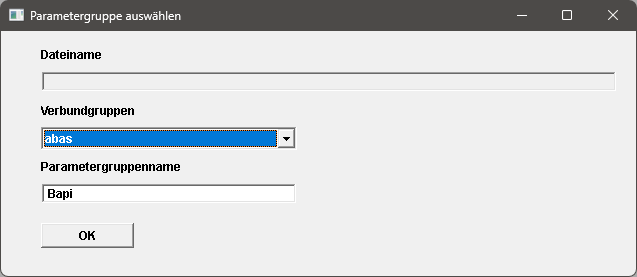
The parameter group cannot exist yet in order to prevent already existing modifications from being overwritten. The parameters in the imported parameter group can be renamed in order to help fill the parameter group by reading from a database or other parameter groups using f$PGCopy, for example. You can also delete parameters no longer required.